> ## Documentation Index
> Fetch the complete documentation index at: https://runway-docs.cfo.ai/llms.txt
> Use this file to discover all available pages before exploring further.
# Drivers basics
> Drivers are the core building blocks of your model in Runway. They represent time series data, allowing you to define, interpret, and connect different parts of your model to track business performance over time.
Drivers are the numbers, dates, and dimension values that power your model over time. Use drivers when you need a business metric or assumption that can be referenced in formulas, shown in tables, visualized in charts, or segmented by dimensions.
This article focuses on drivers in driver tables. Drivers can also be used in databases, which have additional behavior covered in [Formulas in databases](/concepts/databases/formulas-in-databases).
## What is a driver?
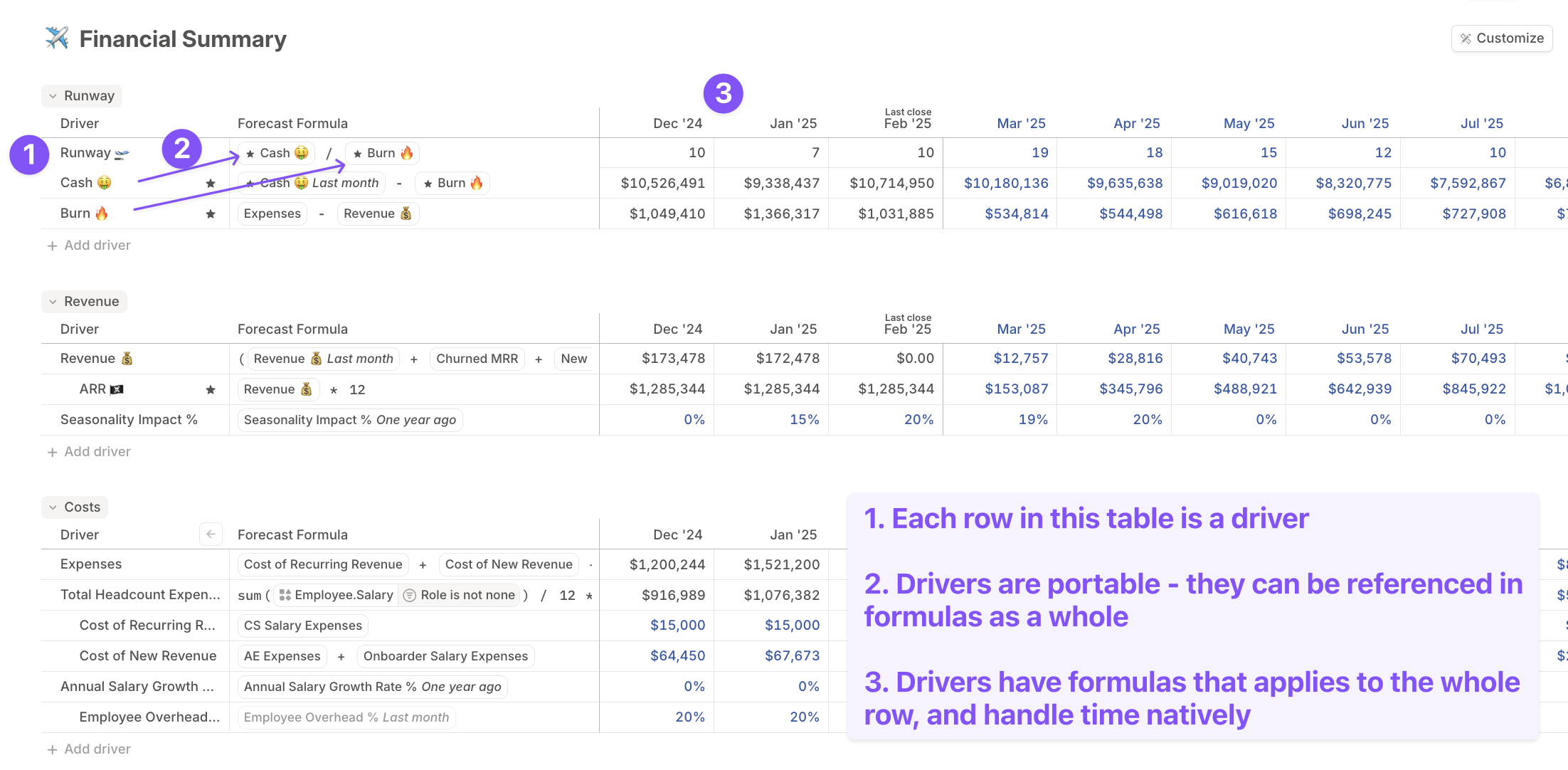
A **driver** in Runway is a structured chunk of **time series data**. It has a human-readable name and represents values that shape your business model, such as revenue, expenses, headcount, renewal dates, or department attributes.
Drivers act as the primary elements in tables and formulas. Conceptually, a driver is similar to:
* A row in an Excel model
* A variable in other modeling systems
## Why use drivers?
Drivers offer several advantages over traditional spreadsheet modeling:
* **Portable:** Drivers can be referenced in formulas, added to tables, and visualized in charts without dealing with cell ranges. They stay synced across your model.
* **Time-native:** Every business assumption changes over time. Drivers make it easy to project those changes across months.
* **Dimensional:** Drivers can use [dimensions](/concepts/dimensions/dimensions-basics) to structure your model as complexity grows.
 ## Driver formulas
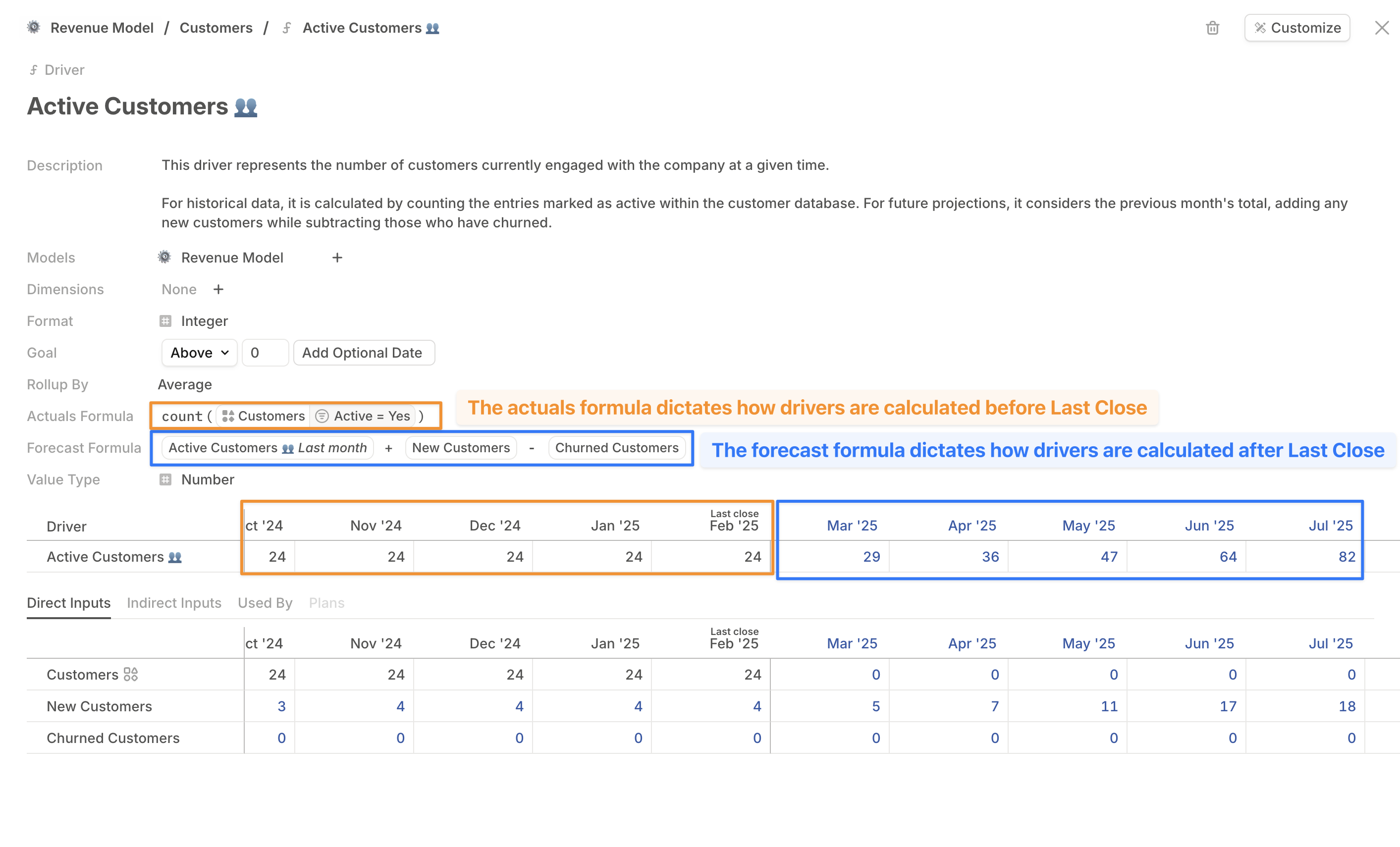
Drivers contain formulas that define their values across different time periods.
* **Forecast formula:** Calculates projected values for future periods after the last close.
* **Actuals formula:** Defines historical values through the last close.
## Driver formulas
Drivers contain formulas that define their values across different time periods.
* **Forecast formula:** Calculates projected values for future periods after the last close.
* **Actuals formula:** Defines historical values through the last close.
 ### Formula inheritance
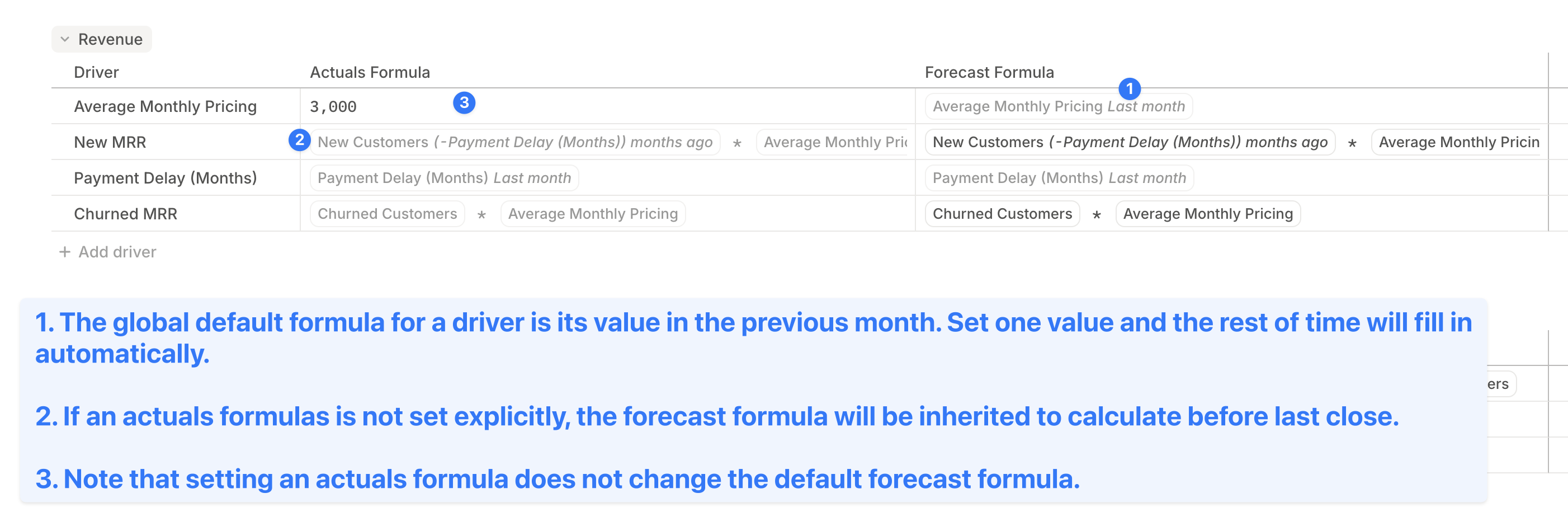
Runway applies smart defaults to fill in missing formulas when needed. The inheritance hierarchy determines how formulas are applied.
**Actuals formula inheritance hierarchy:**
| Priority | Rule |
| -------- | -------------------------------------------------------------------------- |
| First | Explicitly set actuals formula for the driver. |
| Next | Default actuals formula set for the database column the driver belongs to. |
| Fallback | Driver's forecast formula, if no actuals formula is set. |
**Forecast formula inheritance hierarchy:**
| Priority | Rule |
| -------- | ---------------------------------------------------------------------------------------------------------------------------------------------- |
| First | Explicitly set forecast formula for the driver. |
| Next | Default forecast formula set for the database column the driver belongs to. |
| Fallback | Global default formula: the driver's own value from last month (shown in the editor as the driver's name with the **Last month** time period). |
Learn more about [formulas in databases](/concepts/databases/formulas-in-databases).
### Formula inheritance
Runway applies smart defaults to fill in missing formulas when needed. The inheritance hierarchy determines how formulas are applied.
**Actuals formula inheritance hierarchy:**
| Priority | Rule |
| -------- | -------------------------------------------------------------------------- |
| First | Explicitly set actuals formula for the driver. |
| Next | Default actuals formula set for the database column the driver belongs to. |
| Fallback | Driver's forecast formula, if no actuals formula is set. |
**Forecast formula inheritance hierarchy:**
| Priority | Rule |
| -------- | ---------------------------------------------------------------------------------------------------------------------------------------------- |
| First | Explicitly set forecast formula for the driver. |
| Next | Default forecast formula set for the database column the driver belongs to. |
| Fallback | Global default formula: the driver's own value from last month (shown in the editor as the driver's name with the **Last month** time period). |
Learn more about [formulas in databases](/concepts/databases/formulas-in-databases).
 ### Overriding formula values
Hardcoding a cell value overrides the formula for that period. Overridden cells are visually marked so you can distinguish them from formula-driven values. You can also tag overrides to a plan to keep the business context attached to the change. Learn more in [Plans](/concepts/plans).
### Drill-ins
When you need to understand why a driver has a value, use [drill-ins](/concepts/drivers/drill-ins) to expand the driver row and inspect the inputs that feed its formula.
## Driver types
Drivers store time series data in one of three user-facing formats:
* **Number:** Quantitative values like revenue, expenses, or headcount.
* **Date:** Time-based values like project start dates or contract renewals.
* **Dimension:** Categorical values from dimensions, often used when working with HRIS data or other segmented sources.
When entering explicit dates in formulas, use the format `YYYY-MM-DD` enclosed in single quotes.
### Overriding formula values
Hardcoding a cell value overrides the formula for that period. Overridden cells are visually marked so you can distinguish them from formula-driven values. You can also tag overrides to a plan to keep the business context attached to the change. Learn more in [Plans](/concepts/plans).
### Drill-ins
When you need to understand why a driver has a value, use [drill-ins](/concepts/drivers/drill-ins) to expand the driver row and inspect the inputs that feed its formula.
## Driver types
Drivers store time series data in one of three user-facing formats:
* **Number:** Quantitative values like revenue, expenses, or headcount.
* **Date:** Time-based values like project start dates or contract renewals.
* **Dimension:** Categorical values from dimensions, often used when working with HRIS data or other segmented sources.
When entering explicit dates in formulas, use the format `YYYY-MM-DD` enclosed in single quotes.
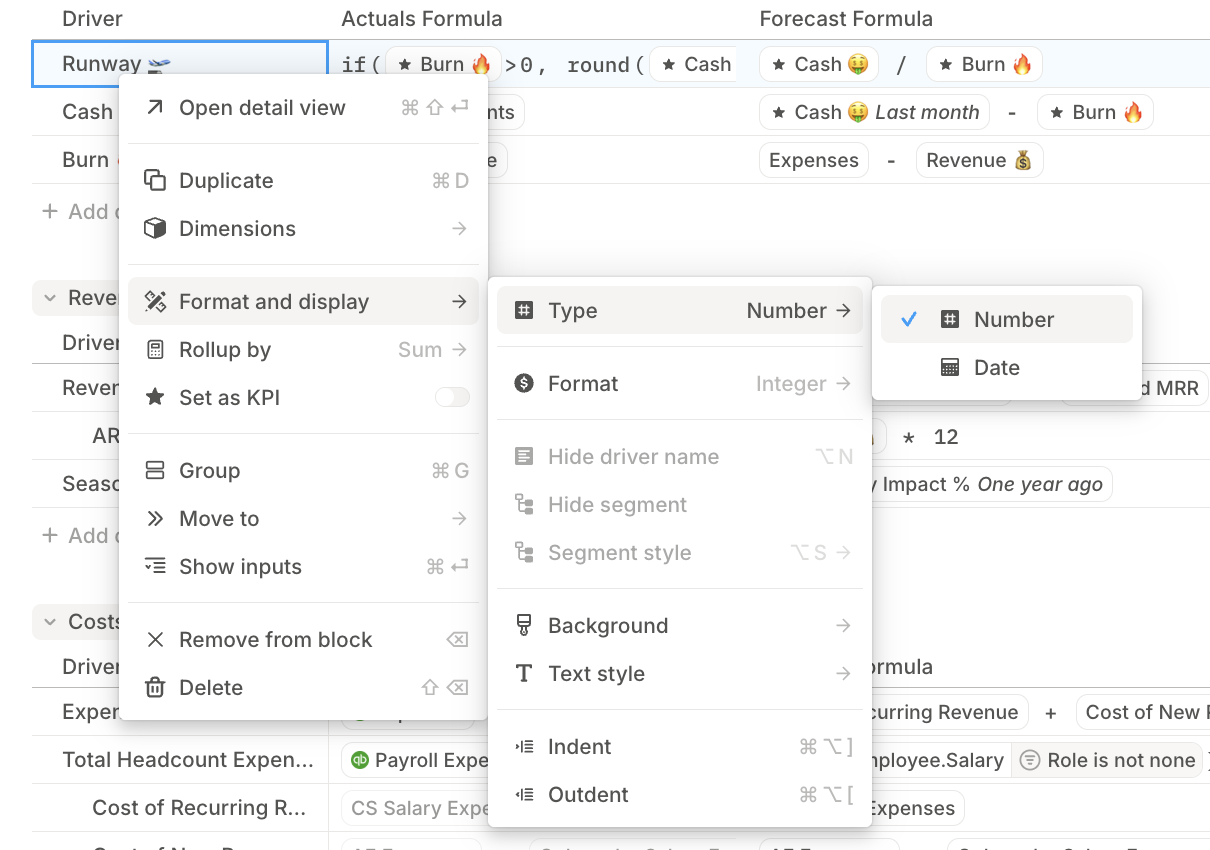 In driver tables, new drivers default to the **Number** type. You can change the type later from **Format and display**.
The type can be updated later, but with constraints:
* Driver formulas must output values that match the driver's type.
* Date functions that return dates require Date drivers.
If a driver formula outputs an incompatible type, the cell displays a `TYPE` error. The tooltip explains that the driver or one of its formula inputs is performing an operation across incompatible types or resolves to a non numeric value.
Date drivers are most useful when working with [drivers in databases](/concepts/databases/formulas-in-databases).
## What's next
* [Formulas basics](/concepts/formulas/formulas-basics)
* [Drill-ins](/concepts/drivers/drill-ins)
* [Segmenting drivers](/concepts/dimensions/segmenting-drivers)
In driver tables, new drivers default to the **Number** type. You can change the type later from **Format and display**.
The type can be updated later, but with constraints:
* Driver formulas must output values that match the driver's type.
* Date functions that return dates require Date drivers.
If a driver formula outputs an incompatible type, the cell displays a `TYPE` error. The tooltip explains that the driver or one of its formula inputs is performing an operation across incompatible types or resolves to a non numeric value.
Date drivers are most useful when working with [drivers in databases](/concepts/databases/formulas-in-databases).
## What's next
* [Formulas basics](/concepts/formulas/formulas-basics)
* [Drill-ins](/concepts/drivers/drill-ins)
* [Segmenting drivers](/concepts/dimensions/segmenting-drivers)