> ## Documentation Index
> Fetch the complete documentation index at: https://runway-docs.cfo.ai/llms.txt
> Use this file to discover all available pages before exploring further.
# Drill-ins
> Use drill-ins to expand a driver row and inspect the inputs that contribute to its values.
Drill-ins let you inspect what contributes to a driver without leaving the table. Use them when you want to trace a formula, understand a variance, or show the rows and drivers behind a modeled number.
## How to use drill-ins
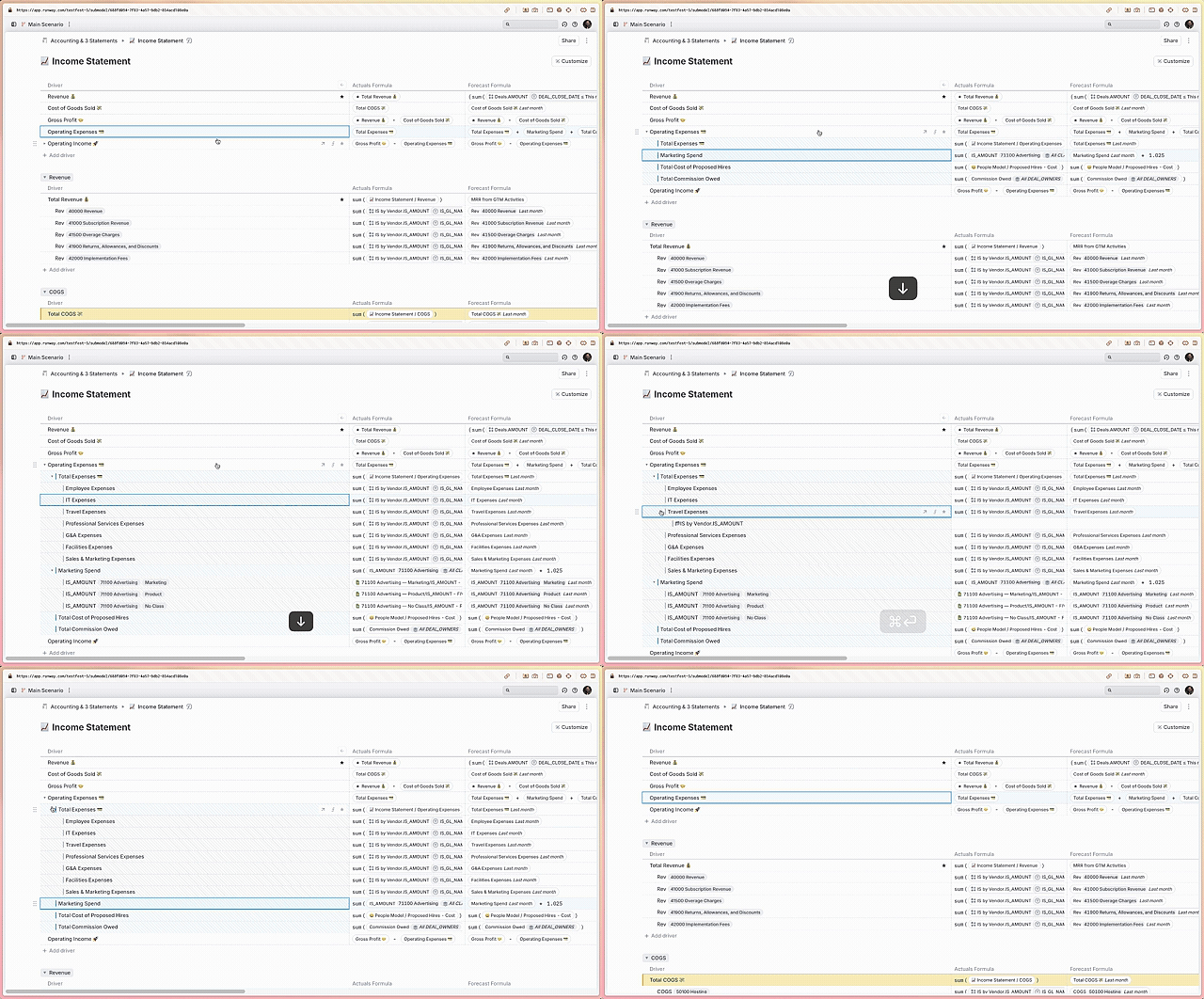
In a driver table, hover over a driver row that can be expanded. A caret appears next to eligible rows.
Click the caret next to the driver name, or right-click the driver and select **Show inputs**. You can also press `⌘⏎` (`Ctrl+Enter` on Windows) on the selected row.
The driver's inputs appear as nested child rows. Drilling into dimensional or database-backed drivers expands segment and object sub-rows, and you can keep drilling into eligible child rows.
Click the caret again, right-click the driver and select **Hide inputs**, or press `⌘⏎` (`Ctrl+Enter` on Windows) again.
Drill-ins support multiple levels of depth. Expand an input line further to inspect its dependencies.
 ## Drill-in access
Drill-ins respect the block-level **Can drill in** access rule. For current access rules, see [Permissions](/guides/sharing/permissions) and [Roles and access](/reference/roles-and-access).
## Open detail view
Use **Open detail view** or press `⌘⇧⏎` (`Ctrl+Shift+Enter` on Windows) to open the details pane for the selected row. The details pane shows **Overview**, **Used By**, and **Plans** tabs when available. See [Driver details pane](/concepts/drivers/driver-details-pane) for more detail.
## Important notes
### Drill-ins are saved per user
Expanding drill-ins affects your own view. Other users do not see the expanded state unless they expand the row themselves.
### Want others to see a breakdown?
If you want other users to view the same rows, add selected drill-in drivers to the block from the row context menu. This makes those driver lines visible in the block instead of depending on each user's expanded drill-in state.
### Drill-in lines have a striped background
Stripes indicate drill-in lines are dynamically generated and will not appear for other users unless expanded.
Drag-and-drop reordering and undo/redo are not supported for drill-in lines.
## What's next
* [Driver details pane](/concepts/drivers/driver-details-pane)
* [Drivers table block](/concepts/pages/drivers-table-block)
* [Permissions](/guides/sharing/permissions)
## Drill-in access
Drill-ins respect the block-level **Can drill in** access rule. For current access rules, see [Permissions](/guides/sharing/permissions) and [Roles and access](/reference/roles-and-access).
## Open detail view
Use **Open detail view** or press `⌘⇧⏎` (`Ctrl+Shift+Enter` on Windows) to open the details pane for the selected row. The details pane shows **Overview**, **Used By**, and **Plans** tabs when available. See [Driver details pane](/concepts/drivers/driver-details-pane) for more detail.
## Important notes
### Drill-ins are saved per user
Expanding drill-ins affects your own view. Other users do not see the expanded state unless they expand the row themselves.
### Want others to see a breakdown?
If you want other users to view the same rows, add selected drill-in drivers to the block from the row context menu. This makes those driver lines visible in the block instead of depending on each user's expanded drill-in state.
### Drill-in lines have a striped background
Stripes indicate drill-in lines are dynamically generated and will not appear for other users unless expanded.
Drag-and-drop reordering and undo/redo are not supported for drill-in lines.
## What's next
* [Driver details pane](/concepts/drivers/driver-details-pane)
* [Drivers table block](/concepts/pages/drivers-table-block)
* [Permissions](/guides/sharing/permissions)